
Ask your AI assistant about your training
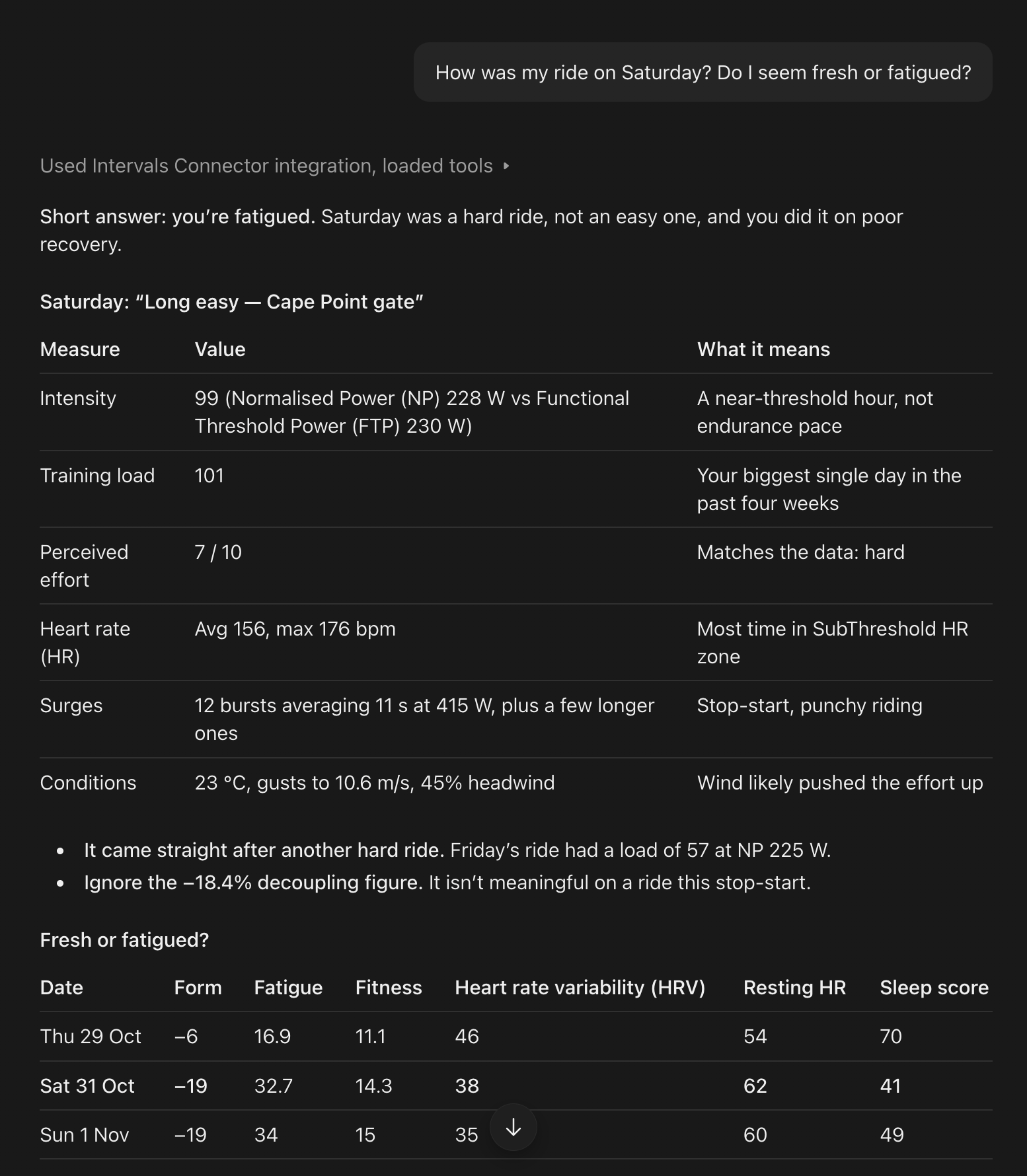
The Intervals.icu Connector links your Intervals.icu account to the AI assistant you already use: Claude, ChatGPT, Gemini or Grok. Ask about your rides and runs in plain words, and it answers with your own Intervals.icu numbers.
Works with




Things you can ask
Talk to it the way you would talk to a coach.
- “How was my ride today?”
- “Am I fresh or fatigued?”
- “How did my last submax test go?”
- “What is my best 5-minute power this season?”
- “Am I on track for my race?”
- “What's the weather for my rides this week?”
- “How have I been sleeping this week?”
- “What are my heart rate zones?”
Things you can do
Your assistant asks before it changes anything.
Your calendar
- “Add an easy 60-minute ride on Saturday.” Then: “Move it to Sunday.” The workout lands on your Intervals.icu calendar and syncs to your Garmin, Wahoo or Zwift like any other.
- “Add a red note on Friday saying I'm travelling.”
- “Delete Saturday's ride.”
Your activities
- “That last ride felt like a 7.” Your effort score, from 1 to 10, is saved on the ride.
- “Delete the duplicate from my watch.” For when two devices recorded the same session.
- “Rename today's run to Parkrun.”
How you feel
- “My legs are heavy and I slept badly.” Saved to your wellness for the day, on Intervals.icu's own scales.
Your settings
- “What would my power zones be at an FTP of 265?” Then: “Set it.” Functional threshold power (FTP) is roughly the highest power you could hold for an hour. Intervals.icu uses it to set your zones and training targets.
Your season
- “I have a cold. Mark me as sick today and tomorrow, I can't train.” It shows on your fitness chart as a sick entry, not a note.
- “Set my weekly target to 8 hours for the next four weeks.”
- “Add a build phase from 1 December to the end of January.”
- “Add the Cape Town Cycle Tour as my A race.” An A race is your main goal of the season.
- “Put the plan we just agreed on my calendar.” You see every change in one list first, then say yes once.
Before anything is deleted or your settings change, the connector shows you exactly what will change and waits for your yes. Your assistant may also ask its own question first.
Connect your assistant
You need an Intervals.icu Supporter plan and an account with one of these assistants. The address to connect is the same for all of them:
https://mcp.intervals.icu/mcp When you connect, Intervals.icu asks you to approve access to your activities, wellness, calendar and settings. That access lets your assistant make the changes above, and only after you agree.
Claude
-
In Claude, open Settings, then Connectors, then Add custom connector.
-
Name it Intervals.icu Connector and paste the address.
-
Select Connect, sign in to Intervals.icu and approve.
-
The first time Claude uses each tool, it asks. Choose Always allow for the tools that only read your data, and it stops asking.
ChatGPT
-
In ChatGPT on the web, open Settings, then Plugins. Select the plus button, then Add custom MCP server.
-
Name it Intervals.icu Connector and paste the address. Leave the sign-in method on OAuth.
-
Accept the risk warning, select Create as a plugin, then install it.
-
Sign in to Intervals.icu and approve. Mention Intervals.icu in your question, for example "check my Intervals.icu plan for today", or ChatGPT may answer from the web instead.
Gemini
-
Use gemini.google.com in a web browser. Sign-in from the desktop app does not finish yet.
-
Open Settings, then Connected apps, and add a custom app with the address. Leave Client ID and secret empty.
-
Sign in to Intervals.icu and approve. Set each tool to Always allow.
-
Start each question with @Intervals.icu Connector. Without it, Gemini uses its own apps instead.
Grok
-
Open grok.com/connectors.
-
Add a custom connector with the address.
-
Sign in to Intervals.icu and approve.
In Grok we have tested asking questions so far. Changes to your calendar, activities and settings have not been tested in Grok yet.
After an update. Some releases add new permissions, and then you disconnect and connect again once. Ask your assistant "Do I need to reconnect?" and it tells you. Every release and whether it needs a reconnect is on the release log.
For Supporters
The connector is part of the Intervals.icu Supporter plan, $4 a month. It is the one Intervals.icu feature that works inside your own AI assistant, and Supporters are what keep Intervals.icu free for everyone else.
Become a SupporterYour data
- Your data goes to the assistant you connect, and the company behind it, under their terms.
- Intervals.icu never sees your conversation.
- Disconnect any time in Intervals.icu Settings, under connected apps.
- Activities that came in from Strava show their date only, because Strava's terms do not allow their data to go to AI tools. Activities from Garmin and other devices connected directly to Intervals.icu are included.
- It reads up to 12 months back. Older history stays in the app.
What it cannot do yet
Today your assistant reads your Intervals.icu numbers and gives you its own interpretation, so two assistants can read the same week differently. Next, Intervals.icu makes more of those calls itself, as it already does for the submax test, so every assistant gives you the same answer. On the list:
- Comparing a planned workout with what you actually did, step by step.
- A daily read on whether you are ready to train, from your form, wellness and test results.
- A workout library your assistant can choose from.
- Torque targets in workouts.
No dates yet. Beta feedback decides the order. Tell us what you want on the forum, or ask your assistant to "send feedback to Intervals.icu".
More
- Release log: every release, what it added, and whether you need to reconnect
- Forum thread: questions, feedback and install help